


Drive through the Pioneer Valley and it looks like every established business already “has a website.” The boxes are checked. There’s a WordPress site for the shop on Main Street, the trades business that’s booked months out, the professional firm that lives on referrals. On paper, they’re covered.
In reality, a lot of those sites are coasting. Not broken. Not embarrassing. Just not doing much. In practice, many Pioneer Valley WordPress sites fall short because the underlying web design and SEO never clearly supports how people find and use the business. In a region where people still lean on word-of-mouth, it’s easy to assume the site doesn’t matter all that much.
The truth is simpler and less comfortable: many of these sites don’t perform because they never clearly say what the business does, where they do it, or who they serve, and they aren’t built to be easily found or used by everyone.
At Cider House, we see the same problems repeat across Western Massachusetts. The good news: they’re fixable. You don’t need a rebrand, a replat form, or a hundred‑page SEO plan. You need clarity, a few foundational changes, and a commitment to accessibility that goes deeper than installing a plugin.
Pioneer Valley WordPress SEO: The “Should Be Easy” Problem
On paper, some local, Pioneer Valley WordPress SEO wins should be layups. A countertop fabricator in Deerfield. A small landscaper serving two or three neighboring towns. There may only be a handful of competitors with any web presence at all.
Yet when you look for them, the results page is full of directories, an out‑of‑state chain, and maybe one other local company that sort of fits. The Deerfield fabricator is nowhere. Not because the work isn’t good, and not because the niche is “too small.”
The real issue is that the site never actually says, in plain language, what they do and where they do it. The real issue is that the site never actually says, in plain language, what they do and where they do it. This is where WordPress web design and SEO start to overlap, because structure, clarity, and content all affect how easily a site can be found.
The homepage is a hero image and a sentence about “quality craftsmanship” that could belong to a dozen industries. There’s no mention of custom stone counters, no list of materials, no towns, no process. Search engines are left guessing. So are humans.
Take the same business and open with a line like: “Custom granite, quartz, and solid‑surface countertops for kitchens and baths in Deerfield, Greenfield, and the surrounding Franklin County area, from template and fabrication to installation.” Suddenly, there’s something to work with. The services are clear. The geography is clear. The visitor understands what’s on the table. So does Google.
That’s the heart of effective local WordPress SEO in the Valley: stop making people decode what you do. Say it plainly, with enough detail that a real person would feel confident they’ve found the right kind of business.
WordPress SEO Basics Most Local Sites Never Finished
Most underperforming Pioneer Valley WordPress sites don’t fail because of advanced SEO problems, they struggle because the web design basics were never fully finished. Not the fancy schema, not the edge‑case technical tweaks. The boring things. The ones that most busy owners meant to come back to and never did.
You can see it in search results. Half the pages are just called “Home” or only show the business name. There’s no hint of the service, the niche, or the region. Meta descriptions are missing or auto‑generated, so the snippet in Google feels like a random sentence fragment instead of an intentional pitch. Headings have been used as a visual trick, multiple H1s because a page builder made it easy, without any real structure underneath.
None of this is glamorous work. It’s also not optional. Search engines and people both rely on those little pieces of scaffolding to decide whether to give your page a chance. A clear page title that pairs what you do with where you do it, “Estate Planning Attorney in West Springfield | [Firm Name]”, tells a story in a single line. A meta description that reads like a two‑sentence invitation gives someone a reason to click instead of scrolling past.
Heading structure is the same story. One H1 that matches the main topic, then H2s and H3s in order, turns a wall of text into a page the brain can scan. It also makes it easier for search engines to understand how your content is organized and which pieces belong together.
Internal links are the quiet part. A key service page sits three levels deep in the menu, unlinked from the homepage, with nothing else pointing at it. From the outside, it barely exists. Once you start linking to it from natural places, an overview page, a related blog post, an FAQ, it becomes part of the site’s story instead of a forgotten corner.
This is the unglamorous layer of WordPress SEO that the better guides keep coming back to: titles, descriptions, headings, internal links, and enough content on each important page that you’re not asking search engines to rank a single lonely paragraph.
 Authentic Website Content for Small Business SEO
There’s another problem, and it shows up in every kind of site, from small studios to professional offices. Most websites are afraid to sound like real people. Owners worry about “saying too much,” so they end up saying almost nothing. Or they write for an imaginary version of Google instead of the actual humans who might become their best next clients.
The result is thin, cautious copy. It checks a keyword box, but it doesn’t answer questions. It avoids specifics. It never really walks through what happens when someone hires you.
The businesses that break out of that pattern do something deceptively simple: they treat the website like a conversation. Not a pitch deck. Not a brochure. A conversation. They talk the way they talk to actual customers.
They describe how things work. How long steps usually take. What happens first, second, third. They name the towns they work in, the kinds of clients they see most often, the situations they handle every week. They answer the questions they’ve heard a hundred times over the phone, right there on the page. They let a little personality show up.
From an SEO perspective, that kind of content lines up almost perfectly with what “helpful content” updates and best‑practice articles keep pointing toward: depth, relevance, clear topical focus, and real‑world experience. From a human perspective, it just feels better. Less like a placeholder. More like a business that knows what it’s doing and isn’t afraid to explain it.
WordPress Accessibility and Inclusive Web Design in the Valley
Then there’s accessibility. For us, this isn’t a checklist on a project plan. At Cider House, we hold a simple belief: the internet should be accessible for everyone. That belief sits under every site we build. It’s why we think about accessibility in the skeleton of a WordPress build, not just as a last‑minute adjustment.
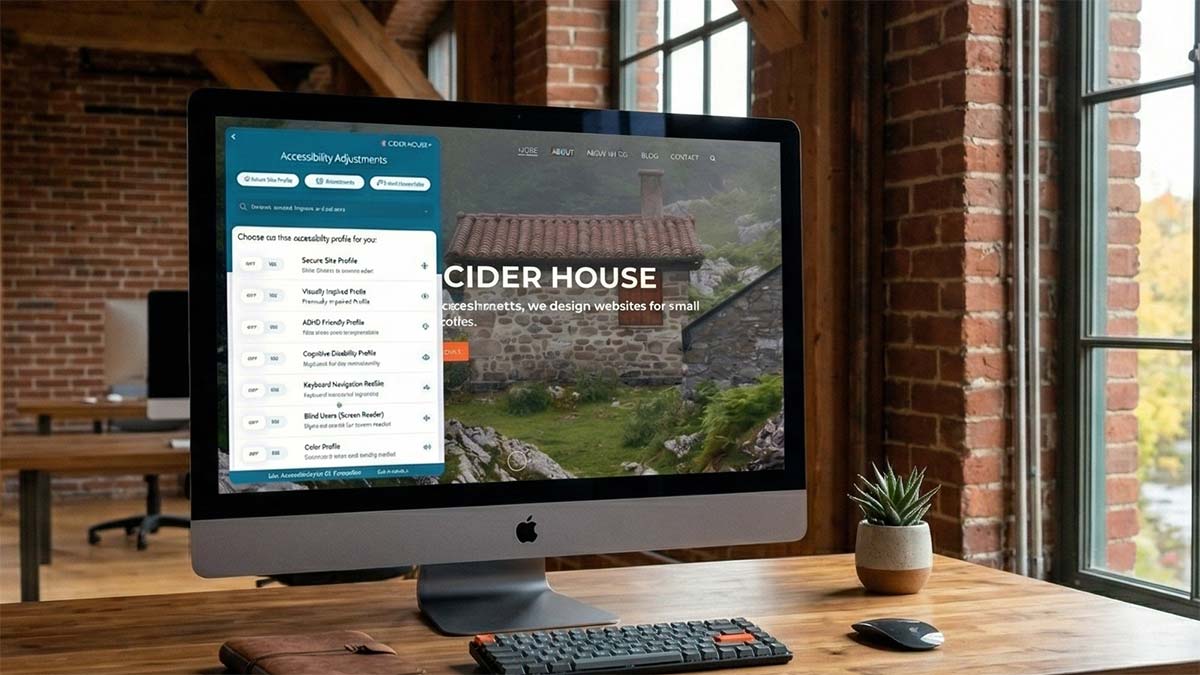
Accessibility tools like AccessiBe give visitors more control over how they experience your site, supporting both usability and Pioneer Valley WordPress SEO.
WordPress accessibility guidance all circles the same core ideas. Use proper headings so screen readers can understand how a page is structured and let people jump between sections. Keep a logical order, one H1, then H2s and H3s that actually reflect the hierarchy of the content, so someone navigating by keyboard isn’t wandering blind through “big text” that means nothing structurally.
Color is part of it too. Text needs to be legible against its background. Following WCAG AA guidelines typically means a contrast ratio of at least 4.5:1 for regular text and 3:1 for large text, so people with low vision or color blindness can read without strain. Links and important states shouldn’t rely on color alone; underlines or other visual cues make them visible to more people.
Want to check the color contrast on your site? Do it here –>
Then there are the quieter details. Writing alt text that actually describes what’s happening in an image, instead of “image123.” Labeling form fields clearly, so someone using assistive technology knows what they’re being asked for. Making sure navigation works with a keyboard, because not everyone can or wants to use a mouse.
This is the foundation. On top of it, there are tools.
We pay particular attention to accessiBe, because it combines automated scanning, ongoing monitoring, and a front‑end interface that gives visitors more control over how they experience your site. It’s not a substitute for doing the structural work, but it can be a meaningful extra layer for businesses that want continuous checks and user‑side adjustments without rebuilding everything from scratch.
Alongside that, there are other helpful options. UserWay‑style widgets can let visitors tweak contrast or text size on the fly. Elementor’s accessibility features (including work that began in the Ally plugin family) can help ensure page‑builder layouts come out with better markup and keyboard behavior.
But none of these tools replace an accessible foundation. They’re additions, not substitutes. The real work still happens in your structure, your color choices, your headings, your labels, and your content.
When we think about accessibility for a Pioneer Valley business, we’re thinking about specific people: someone in Northampton using a screen reader to book an appointment, someone in Amherst with low vision trying to donate from a phone, someone in Greenfield who navigates entirely by keyboard. A site that works for them is better for everyone, and, as a bonus, many of the same changes make it easier for search engines to crawl and index your content.
Local SEO in Western Massachusetts: Different Towns, Same Foundation
Not every market in Western Massachusetts plays by the same rules. A business competing in Springfield is usually swimming in deeper water than a similar business in a smaller town. There are more sites, more budgets, more people paying attention to SEO.
That doesn’t make the fundamentals optional in quieter places. If anything, it makes them more powerful. When most of your local peers are still running vague, half‑finished WordPress sites, being the business whose site clearly explains what you do, where you do it, how it works, and how to get started is a serious advantage.
In the more competitive pockets, the same foundation is just the starting point. You stack more on top: additional content, sharper positioning, more focused local signals, a deeper strategy. But you still begin in the same place, clear titles, real descriptions, thoughtful structure, authentic information, and accessibility baked into the build.
For us, that’s the real work of “fixing” underperforming WordPress sites in the Pioneer Valley. Not tricks. Not hacks. Just treating the site like what it actually is: infrastructure for your business, meant to be used by real people with real constraints, over and over again.
